
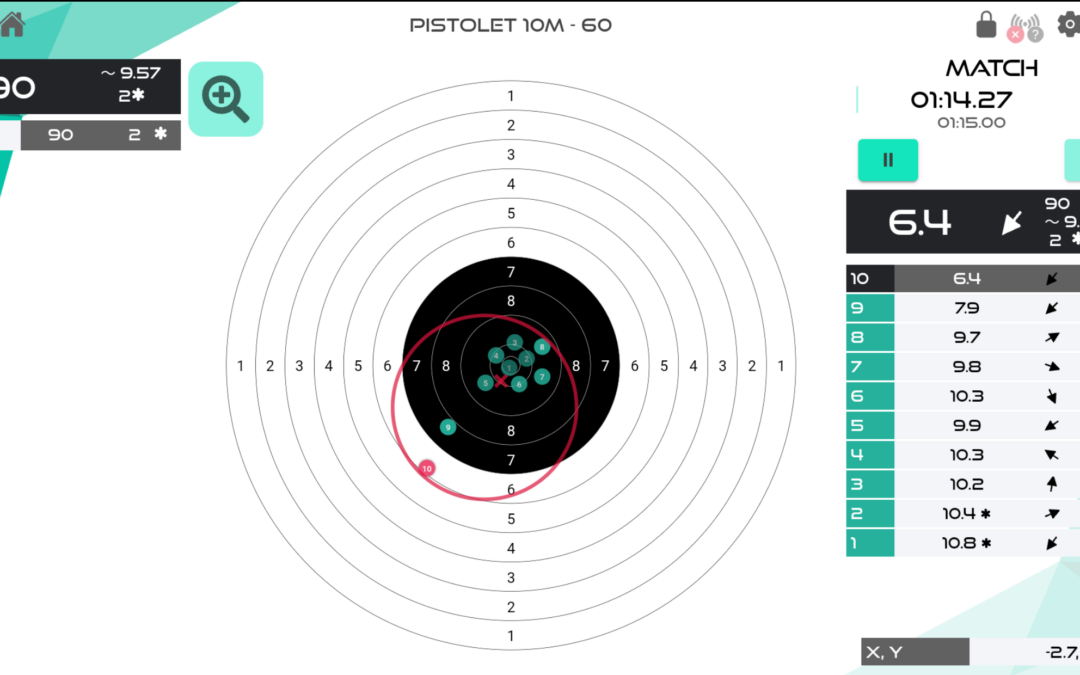
Grouping (or “clustering”) is one of the most useful indicators on our electronic targets, but also one of the most misunderstood. Here’s how to read it correctly.
The red circle: dispersion
When the “grouping” option is enabled in the display settings, a red circle appears around the current series of impacts. It represents the average dispersion of your shots, with its diameter also shown as a numerical value next to it.
The red (X): the mean position, not the center of the circle
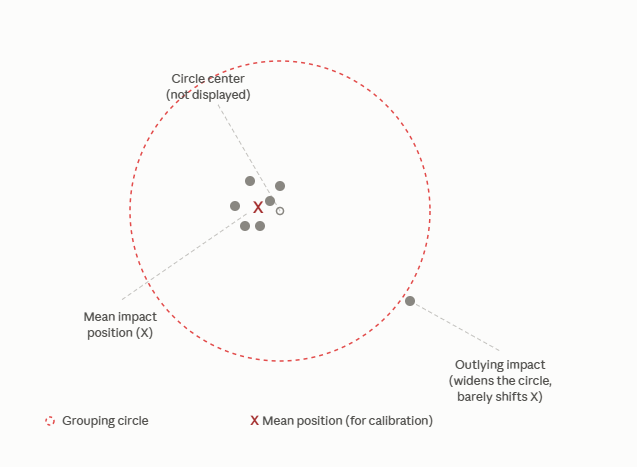
This is the point that’s often misunderstood: the red (X), along with its corresponding (x, y) coordinates, does not indicate the geometric center of the circle, but the mean position of all the impacts.
Why this distinction matters
In practice, this means that a single impact that lands far away from the rest of the group will have:
- a strong influence on the circle, since the circle must by definition encompass all impacts, including the most outlying ones;
- but a much more limited influence on the mean position (X), which stays anchored close to the core of the group.
Why we use the mean position for sight calibration
We chose to display the mean position rather than the geometric center of the circle, because this value best reflects the actual behavior of your shooting when adjusting your sighting device. A circle’s center can be artificially “pulled” by a single stray shot, whereas the mean of the impacts (x, y) gives a more accurate and stable picture of your natural point of impact.
In short: to adjust your sights, always rely on the red (X) and its (x, y) coordinates.